Web navigation continues to evolve as users demand faster, more intuitive, and visually appealing experiences. Drop-down menus, once seen as a simple list of links, now play a crucial role in helping users discover content quickly and efficiently. As designers seek the best ways to streamline user journeys and reduce friction, innovative menu design is transforming how visitors navigate a site. There is a growing emphasis on simplicity, responsiveness, and personalization, all centered on the user’s needs. To see practical examples and creative executions, you can explore a comprehensive gallery of drop down menu inspirations from top brands and designers. These advancements are not just about aesthetics, as they directly influence engagement and satisfaction. Today’s web visitors expect menus that feel light and natural, whether interacting on a desktop or a mobile device. This need for seamless navigation has led to several prominent trends, each offering distinct advantages for usability and performance.
Minimalist Designs
Cluttered interfaces often lead to confusion and frustration. Modern designers are increasingly turning to minimalist drop-down menus that strip away the unnecessary and emphasize clarity. This trend focuses on presenting a concise set of links, using whitespace to create visual breathing room, and highlighting essential destinations without distraction. Simple typography, clear iconography, and subtle dividing lines are core characteristics.
Minimalist menus also provide better accessibility and adaptability for responsive design. By limiting the number of options displayed, users can make decisions more quickly, significantly reducing cognitive load.
Mega Menus
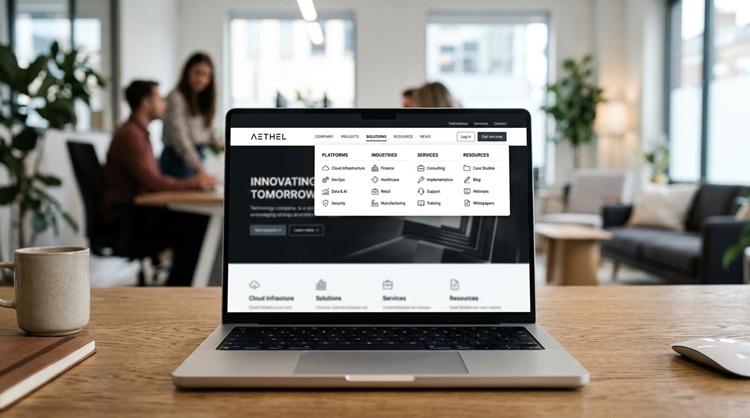
While minimalism suits smaller websites, extensive content collections call for a more robust solution. Mega menus are an ideal response, especially for e-commerce, enterprise, and educational platforms. These large drop-downs group links into visually distinct columns, often embellishing categories with icons, product images, or even promotional banners. When executed thoughtfully, mega menus let users see the site’s breadth at a glance, reducing the need for excessive clicking or back-and-forth navigation.
Gesture-Based Navigation
The surge in mobile-first design has inspired new approaches to interactivity. Touch gestures such as swipe, tap-and-hold, and pull-down actions are increasingly supported in drop-down menus. These navigation gestures create a more fluid and intuitive interface that closely mirrors the natural way users interact with their devices. Incorporating gesture-based controls can also make navigation faster and more enjoyable, particularly on mobile devices, where conventional hover actions are not feasible.
Dark Mode Integration
Dark mode is now a standard feature on major digital platforms. Incorporating drop-down menus that work seamlessly in both dark and light modes is essential for consistency and user comfort. The key is maintaining a strong contrast, ensuring all text and icons remain clearly visible regardless of the selected theme. For many users, dark mode reduces eye strain during extended browsing sessions or in low-light environments. Carefully tailored dark-mode menus demonstrate attention to user preferences and can help improve retention and accessibility.
Animated and Micro-Interactions
From fade-ins to bouncy hover states, animation and micro-interactions enhance menu usability by providing feedback and signposting to users. Smooth transitions help orient visitors, highlight clickable areas, and make navigation feel more engaging and delightful. However, animation should always serve a purpose. Subtlety is key; overusing effects can slow down the interface or distract from the content.
Accessibility Considerations
A well-designed drop-down menu serves every visitor, regardless of physical or cognitive ability. Accessibility best practices require ensuring that menus are keyboard navigable, compatible with screen readers, and maintain sufficient text-background contrast. ARIA (Accessible Rich Internet Applications) roles and labels help assistive technologies and users.
Best Practices for Implementing Drop-Down Menus
- Clear Indicators: Use arrows or other markers to let users know more options are available in a drop-down menu.
- Responsive Design: Test your menus on a variety of screen sizes and devices to ensure smooth, consistent performance.
- Limit Levels: Avoid overly deep nesting; shallow structures are easier for users to navigate.
- Test Usability: Regularly conduct user testing and gather feedback to discover pain points and refine the experience.
By embracing these trends and adhering to best practices, designers can create drop-down menus that combine aesthetic appeal with exceptional usability. As the web evolves, navigation will remain a cornerstone of the digital experience, and getting it right ensures visitors enjoy both effortless discovery and greater satisfaction.
Conclusion
Modern drop-down menus have evolved into essential tools for creating smooth, intuitive, and accessible website experiences. From minimalist layouts and mega menus to gesture-based navigation, dark mode compatibility, and thoughtful animations, today’s designs focus on improving usability while meeting changing user expectations. By prioritizing simplicity, responsiveness, accessibility, and clear organization, designers can create navigation systems that help visitors find information quickly and comfortably. As web technology continues to advance, successful drop-down menus will remain centered on user needs, blending innovative features with practical functionality to deliver seamless digital experiences across all devices.